
For more information, visit http://www.microendeavors.com or contact MEI at 800-331-9434 / 610-449-4680 or training@microendeavors.com
Module Overview
This module covers the following concepts:
Module Objectives:
When you have completed this module, you will know how to:
Relationships
Session Objectives:
When you have completed this session, you will have learned about:
Most applications involve multiple tables, many of which are involved in relationships. A relationship exists when one table contains records that are "owned" by a record in another table.
For instance, meordh contains order records that are owned by a customer (mecust). The line items table (meordl) contains line item records that are owned by a given order (meordh).
Instead of using the SEEKand DO WHILE commands to find and use all the child records, Visual FoxPro 5.0 will do the work for us if we establish a relationship between the parent and child tables.
SET RELATION TO <expression> INTO <child work area> ;
IN <parent work area>
Notice the new IN clause of the SET RELATION TO command. This clause allows the developer to establish the source work area without first SELECTing that work area.
The SET RELATION TO command directs Visual FoxPro 5.0 to perform a SEEK in the target (child) work area, whenever the record pointer is moved in the source (parent) work area.
The value to SEEK is the value of <expression>, where the <expression> is the field or fields that make up the unique identifier in the parent table (e.g., oh_orderno).
The target, or child table, must have the correct master order set.
For example, to establish a relationship between the customer and the orders tables we would do the following:
SET ORDER TO oh_custid IN meordh
SET RELATION TO cu_custid INTO meordh IN mecust
IT IS RECOMMENDED THAT THE KEYWORD ADDITIVE BE INCLUDED IN THE SET RELATION TO COMMAND TO PRESERVE ALL EXISTING RELATIONSHIPS IN THE CURRENTLY SELECTED WORK AREA WHEN CREATING A NEW RELATIONSHIP.
If ADDITIVE isn't included, any existing relationships in the current work area are removed and the new relationship is established.
For instance, let's say you have payments, line items and orders tables. You have already established a relationship between the orders and the line items tables. However, you now need to establish a relationship between the orders and the payments. To do so without losing the relationship between orders and line items you need to issue the following command:
SET RELATION TO oh_orderno INTO mepaymnt IN meordh ADDITIVE
Finally, to "break" a relationship between files you need to issue the SET RELATION TO command without specifying anything further. Alternately, you may use SET RELATION OFF INTO <workarea>. However, you must be positioned in the parent work area before releasing the relationship.
One to Many RelationshipsWhen you establish a relationship between tables, Visual FoxPro 5.0 assumes a one-to-one relationship. That is, Visual FoxPro 5.0 will only present the first occurrence of a child, not all of the children.
In order to establish a one-to-many relationship, whereby all the children will be displayed for the current parent record, you need to invoke the SET SKIP command.
SET SKIP TO <work area>,<work area>,etc...
SET SKIP establishes a one to many relationship whereby any effort to move the record pointer in the source (parent) table, first moves the record pointer in the target (child) work area. If the movement in the child results in a "break" in the relationship, the record pointer is moved in the parent table, and the relationship is re-established.
Commands that allow use of a FOR clause, such as BROWSE, COPY, and REPORT FORM, will respect relationships and SET SKIP.
Persistent RelationshipsBesides establishing relationships programmatically, Visual FoxPro 5.0 allows you to create visual, persistent relationships between tables associated with a Database Container (see Figure 2.1).
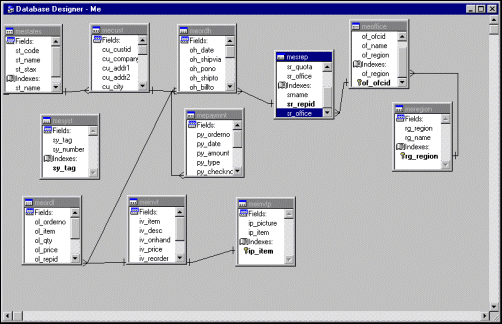
Figure 2.1 Persistent Relationships as Shown in the Database Designer
These persistent relationships are stored in the DBC, and are therefore available whenever the DBC is open. Persistent relationships provide two benefits to the developer/user.
First, and foremost, persistent relationships are required to establish referential integrity. Second, persistent relationships provide default join conditions for the View and Query Designers.
To create a persistent relationship, one table must have the primary key (e.g., cu_custid) and the other table the foreign, or relational, key (e.g., oh_custid) index. If these indexes do not exist, you will need to modify the Database Container and create them through the Index page of the Table Modify dialog.
Once you have the proper indexes, you can create either one-to-one or one-to-many relationships depending upon the type of indexes you are attempting to join. The one-to-one relationship is established by relating a primary key in the parent table to a primary key in the child table. The one-to-many relationship is established by relating a primary, or candidate, key in the parent table to a “regular” key in the child table.
In order to create a persistent relationship, you need to open the Database Container exclusively:
CLEAR ALL
CLOSE ALL
OPEN DATABASE ME EXCLU
Figure 2.2 The Edit Relationship Dialog
Then, go into the Database Designer:
MODIFY DATABASE
The rest is simply a matter of dragging the primary, or candidate, key index from the parent table onto the regular (foreign value) key index of the child table. The end result of this drag and drop activity is the Edit Relationship dialog seen in Figure 2.2.
Notice in Figure 2.2 that the “relationship type” is read only. The relationship type is established based on the type of index in the child table. If the index selected in the child table is primary or candidate, the relationship type is one-to-one. If the index selected in the child table is regular, the relationship type is one-to-many. If you attempt to establish a non primary relationship between tables that does not use a primary or candidate key in the parent table, Visual FoxPro 5.0 will place a “do not” sign on the screen indicating that this activity is not allowed by the system.
Once the relationship has been accepted by your having selected the OK command button, a one-to-many relationship line will appear between the two tables.
Exercise 2-1: Persistent RelationshipsReferential Integrity
Session Objectives:
When you have completed this session, you will have learned about:
Having established relationships between tables, the database should insure that the relationship remains intact. In this case, we expect that foreign keys in the child table have matching primary keys the related parent tables.
Referential integrity insures that there are no orphaned child records in the database. To put it another way, there should never be a foreign key value in a child record that references a non-existent primary key in a parent record. Most database products provide some form of Referential Integrity, and we will address each of the standard RI rules in the following section.
DeletesWhen a parent row is deleted, it is possible that child rows in one or more related tables will be orphaned. To avert this, many database products provide three possible delete rules:
In a Restrict Delete, the system checks to see if there are any children for the parent row that has just been deleted. If even one such child exists, the delete is aborted (via a transaction rollback), and an error is raised.
In a Cascade Delete, the system checks to see if there are any children for the parent row that has just been deleted. If children exist, those children are also deleted.
When using cascading deletes, you must be fully aware of all relationships within the database and make sure that the cascade is in effect for all of them. For example, if you want to delete every record in the database that is in any way associated with a particular customer, you must establish a Cascading delete for the relationships between mecust and meordh, meordh and meordl, and meordh and mepaymnt.
Further, there are ancillary considerations. For instance, inventory quantity on hand and backordered fields need to be updated. But how can you update inventory quantities if the inventory has been shipped and not returned? Deleting payments means that the accounts received amounts will never match with bank statements on amount deposited, etc.
All in all, a true cascading delete is rarely put into practice.
The last type of delete is a non delete. In other words, the records can never be deleted. There may be a field that flags the record as having been voided, or the record may be moved to an archive file, but the information itself is never completely removed.
The most common reasons for using a non-delete are when the business rules cannot tolerate a “hole” in the numbering system. For example, my favorite application would be one in which the user has given me permission to delete checks. Imagine what the creative developer can do!
The same is true for most order entry systems: missing invoice numbers are not acceptable. Therefore, as developers, we must be aware of and explain to the user, the impact of deletes both in terms of referential and system integrity.
WHILE VISUAL FOXPRO DOES NOT EXPLICITLY SUPPORT THE NON OPTION FOR DELETES, THIS CAN EASILY BE ACCOMPLISHED BY RETURNING A .F. VALUE FROM AN EXPRESSION SPECIFIED IN THE TABLE’S DELETE TRIGGER.
In addition to Cascade and Delete, Visual FoxPro allows the application to Ignore Delete integrity. If the developer establishes Ignore for the Delete associated with a relationship, no checking is done when a record is deleted in the parent table.
UpdatesWhen a parent row’s primary key is updated, it is possible that child rows in related tables will be orphaned. Here are the remedies available in many systems:
When a foreign key value in a row in a child table is updated, it is possible that the new value will not match any rows in the parent table. To prevent this, most database systems support Restricted Updates.
When a primary key value is changed in a parent row, the system checks to see if there are any children associated with this parent. If there is even one child associated with this parent, the update is aborted.
In a Cascade Update, the system searches for children of the parent row whose primary key has just been updated. The foreign key values in any children that are found in the search are updated to match the new primary key value assigned to the parent row.
Some database management systems provide a different level of restriction on the update of foreign keys. They simply disallow any change to primary keys!
VISUAL FOXPRO DOES NOT EXPLICITLY SUPPORT THE NO UPDATES OPTION, BUT THIS CAN BE ACCOMPLISHED BY RETURNING .F. FROM THE UPDATE TRIGGER OF THE AFFECTED TABLES.
In addition to Cascade and Delete, Visual FoxPro allows the application to Ignore update integrity. If the developer selects Ignore for the update associated with a relationship, no checking is done when parent primary keys are updated.
IN SQL-SERVER, AND SOME OTHER DATABASES, UPDATES CONSIST OF A DELETE OF THE OLD ROW, AND AN INSERT OF THE NEW ROW. VISUAL FOXPRO DOES NOT USE THIS TECHNIQUE.
InsertsThe final area of concern for referential integrity lies with the addition of a new record. In this case, the insertion of a child record (e.g., line item) when there is no extant parent (e.g., order). There are only two ways of dealing with an insert anomaly: restricting the entry of the child record, or ignoring the entry of an orphaned child record..
TriggersA trigger is a specialized record-level stored procedure that is automatically run after an insert, update, or delete has occurred. Different actions can be attached to the different events. Triggers are applied after field and row level rules, and do not run during buffered updates unless TABLEUPDATE() is issued (more on table buffering and the TABLEUPDATE() function later). While triggers are most often used to safeguard referential integrity and system consistency (such as being able to update the inventory table during a line item insert, update or delete), you can place any type of code within the trigger.
You can create a trigger through the Table Properties window of the Table Designer (see Figure 2.3), by issuing the CREATE TRIGGER command or by using the Referential Integrity Builder.
Create TriggerIf you choose to use the CREATE TRIGGER command, the syntax is as follows:
CREATE TRIGGER ON <<TableName>> FOR DELETE | INSERT | UPDATE AS <<expression>>
In order for a trigger to be executed, Visual FoxPro 5.0 needs the following information: the table in the current database with which the trigger is to be associated, the type of trigger (i.e., the action that will invoke the trigger) and the logical expression evaluated when the trigger occurs. This expression can be a user-defined function or a stored procedure that returns a logical value.
STORED PROCEDURES ARE CREATED FOR A TABLE WITH MODIFY PROCEDURE COMMAND. IF THE TRIGGER RETURNS .F., THE DEVELOPER CAN USE THE AERROR() FUNCTION TO DETERMINE THE NAME OF THE TABLE FOR WHICH THE TRIGGER OCCURRED AND THE TRIGGER TYPE (I.E., INSERT, UPDATE OR DELETE). REFERENTIAL INTEGRITY TRIGGERS ADDITIONALLY POPULATE A PUBLIC GAERRORS[] ARRAY WITH INFORMATION ABOUT THE RI VIOLATION THAT CAUSED THE TRIGGER TO FAIL.
If the trigger expression evaluates to true (.T.), the command or event that caused the trigger to occur is executed. If the expression evaluates to false (.F.), the command or event that caused the trigger to occur is rolled back
The following describes the events that cause a Delete, Insert, or Update trigger to occur.

Figure 2.3 Triggers Shown in the Table Designer
Delete TriggerA delete trigger is executed when the DELETE command is issued, or a record is marked for deletion in a Browse window or Edit window.
Insert TriggerAn insert trigger is executed whenever any of the following commands are issued or events occur:
Update Trigger
Lastly, an update trigger will be executed whenever any event that causes a record to be modified occurs. For example, the Update trigger occurs when a control on a Form changes the contents of a field, or when any of the following commands are issued:
CREATE TRIGGER also has a few other issues:
To make matters a little more complicated, the timing of the trigger execution depends on the current buffering mode.
If table buffering isn't in effect, the Update trigger occurs when the record is updated, but after rules and primary and candidate index keys are checked.
If table buffering is in effect, the Update trigger occurs when TABLEUPDATE() is issued and each buffered record is updated in the table.
Referential Integrity Builder
The Referential Integrity Builder can be used to create update, insert, and delete trigger code for persistent relationships. If you want to create trigger code for an individual table or a trigger based upon a relationship other than the one defined in the Database Container, you will need to write the trigger yourself.
In order to use the Referential Integrity Builder, you need to establish a persistent relationship between two tables. Once the relationship has been created, you can activate the Builder in one of three ways: the Referential Integrity option on the Database menu, the Referential Integrity option on the Database Designer shortcut menu, or from the relationship itself (see Figure 2.4).
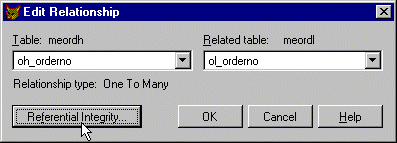
Figure 2.4 Activating the Referential Integrity Builder
TO ACTIVATE THE BUILDER FROM THE RELATIONSHIP, DOUBLE CLICK ON THE RELATIONSHIP LINE IN THE DATABASE DESIGN WINDOW.
As you can see from Figure 2.5, the Referential Integrity Builder displays all the persistent relationships and allows you to choose the type of referential integrity rule (e.g., Restrict) you want written for each of the trigger points (i.e., Insert, Update and Delete).
Once you have determined what rules you want enforced for each persistent relationship, you can have Visual FoxPro 5.0 write the appropriate trigger code into the Database Container stored procedures by choosing the OK command button.
TO VERIFY THAT THE CODE WAS ACTUALLY WRITTEN, EDIT THE STORED PROCEDURES SECTION OF THE DATABASE CONTAINER AND LOOK FOR PROCEDURES THAT BEGIN WITH __RI. YOU SHOULD FIND ONE PROCEDURE FOR EACH RELATIONSHIP TRIGGER POINT THAT WAS NOT SET TO THE IGNORE OPTION.
RI CODE IS PLACED IN THE STORED PROCEDURE SECTION OF THE DATABASE CONTAINER. A HEADER AND FOOTER IS WRITTEN TO BRACKET THE RI CODE. WHENEVER THE RI BUILDER IS USED TO CREATE TRIGGER CODE, VISUAL FOXPRO 5.0 LOOKS FOR THIS HEADER AND FOOTER AND REPLACES THE CODE FOUND WITHIN.
THEREFORE, IT IS NOT A GOOD IDEA TO MODIFY THIS TRIGGER CODE. INSTEAD, YOU SHOULD ADD A REFERENCE TO YOUR CODE TO THE TABLE PROPERTIES TRIGGER REFERENCE:
__ri_insert_mecust() AND ri_myproc()
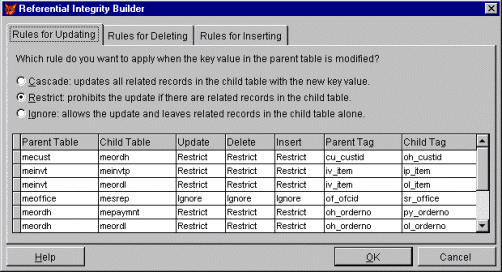
Figure 2.5 The Referential Integrity Builder
Exercise 2-2: Referential Integrity BuilderTrue or False. To establish a relationship between a parent and child file, you need to have relational key fields in both files and the proper index order set in the parent.
Write the code necessary to establish a relationship between the customer (file: mecust field:cu_custid) and the order header (file: meordh field:oh_custid) files:
What command is necessary to establish a one-to-many relationship between two files?
True or False. Trigger code always executes before any other implicit validation such as a field level rule.
What three ways can be used to create triggers?